


X

Lütfen Ülke (Bölge) Seçiniz

Türkiye (Türkçe)Türkiye (Türkçe) Worldwide (English)Worldwide (English)
X

Lütfen Ülke (Bölge) Seçiniz

Türkiye (Türkçe)Türkiye (Türkçe) Worldwide (English)Worldwide (English)

Bilgi Bankası

AnasayfaBilgi BankasıTestHow to Delete an Uncategorized Cate...

How to Delete an Uncategorized Category in WordPress

You cannot remove the Uncategorized category, but you can rename it.


1. Log in to the WordPress dashboard.


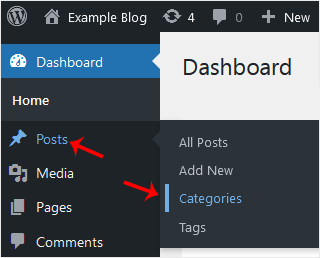
2. From the Dashboard menu, go to Posts and click on Categories.


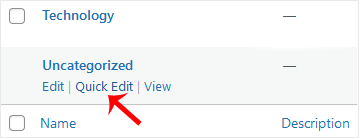
3. Hover your mouse on the Uncategorized option and click on Quick Edit.


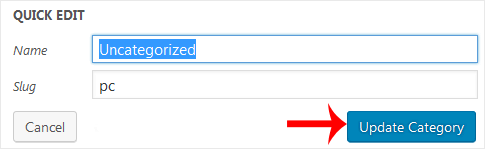
4. Change its name and slug, and confirm with Update Category.

Aradığınız Bilgiyi Bulamıyor musunuz?

Bilgi bankasını detaylı olarak incelediniz, fakat ihtiyacınız olan bilgiyi bulamıyorsanız,

Bir Destek Talebi Oluşturun.
Faydalı Buldunuz mu?
(114 defa görüntülendi. / 0 kişi faydalı buldu.)

Powered by WISECP
Top