A subdomain is an additional part of your primary domain. For example, blog.example.com is a subdomain. Please, follow this tutorial to create a subdomain in SiteWorx.
1. Log in to your SiteWorx account.
2. In the Domains section, click on Subdomain.
3. Click on the Plus icon. 
4. Enter your subdomain name, and choose the appropriate domain from the drop-down menu if there are multiple domains. Then click on Add.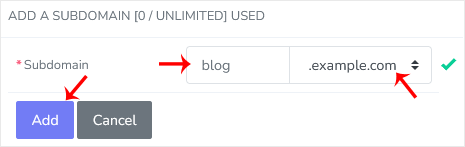
You should see a success message that the subdomain has been created.
Bilgi bankasını detaylı olarak incelediniz, fakat ihtiyacınız olan bilgiyi bulamıyorsanız,
Bir Destek Talebi Oluşturun. Copyright © 2026 Tüm Hakları Saklıdır.

 Türkiye (Türkçe)
 Worldwide (English)