


Y���kleniyor...
Yeni satın alımlara özel %20 İNDİRİM — Kod: ZIP20
X

Lütfen Ülke (Bölge) Seçiniz

Türkiye (Türkçe)Türkiye (Türkçe) Worldwide (English)Worldwide (English)
X

Lütfen Para Birimi Seçiniz

₺ Türk Lirası $ US Dollar
Bilgi Bankası How to Write and Publish Your First Blog Post in WordPress

How to Write and Publish Your First Blog Post in WordPress

174 görüntüleme 0 faydalı buldu

Writing your first blog post is a fascinating thing. Follow the steps below to do so in WordPress.


1. Log in to the WordPress dashboard.


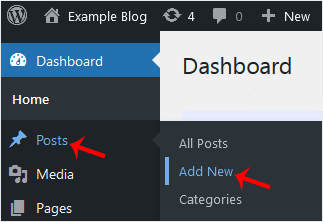
2. From the Dashboard menu, go to Posts and click on Add New.


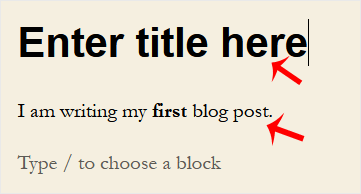
3. Enter your post title and write your blog post.


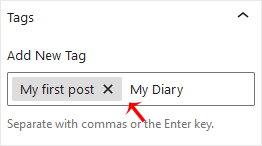
4. Under the Post tab, click on Tags, type post-related tags, and press Enter. You can enter multiple tags.


5. From the Categories, select the appropriate one or click on Add New Category.

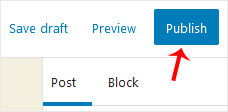
6. Now, at the top side, find Publish and click on it twice.
 

Congratulations on writing your first blog post.

Aradığınız Bilgiyi Bulamıyor musunuz?

Bilgi bankasını detaylı olarak incelediniz, fakat ihtiyacınız olan bilgiyi bulamıyorsanız,

Bir Destek Talebi Oluşturun.

Faydalı Buldunuz mu?

Şimdi
Arayın

WhatsApp ile
İletişim Kur

X

Lütfen Ülke (Bölge) Seçiniz

Türkiye (Türkçe)Türkiye (Türkçe) Worldwide (English)Worldwide (English)
X

Lütfen Para Birimi Seçiniz

₺ Türk Lirası $ US Dollar