


Y���kleniyor...
Yeni satın alımlara özel %20 İNDİRİM — Kod: ZIP20
X

Lütfen Ülke (Bölge) Seçiniz

Türkiye (Türkçe)Türkiye (Türkçe) Worldwide (English)Worldwide (English)
X

Lütfen Para Birimi Seçiniz

₺ Türk Lirası $ US Dollar
Bilgi Bankası How to Disable the Two-Factor Authentication on Your cPanel Account

How to Disable the Two-Factor Authentication on Your cPanel Account

253 görüntüleme 0 faydalı buldu

Follow this instruction to remove two-factor authentication from your cPanel account.


1. Log in to your cPanel account.


2. In the Security section, click on Two-Factor Authentication.


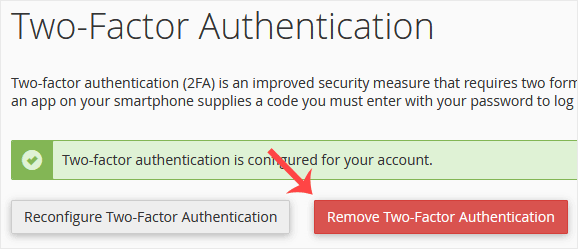
3. Click on Remove Two-Factor Authentication.

4. For confirmation, click on Remove.
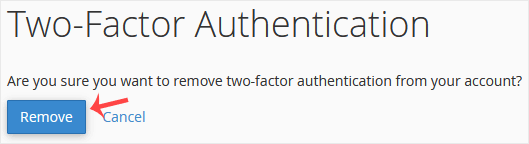

It should show a message such as Success: The system removed the two-factor authentication from your account.

Aradığınız Bilgiyi Bulamıyor musunuz?

Bilgi bankasını detaylı olarak incelediniz, fakat ihtiyacınız olan bilgiyi bulamıyorsanız,

Bir Destek Talebi Oluşturun.

Faydalı Buldunuz mu?

Şimdi
Arayın

WhatsApp ile
İletişim Kur

X

Lütfen Ülke (Bölge) Seçiniz

Türkiye (Türkçe)Türkiye (Türkçe) Worldwide (English)Worldwide (English)
X

Lütfen Para Birimi Seçiniz

₺ Türk Lirası $ US Dollar