


X

Lütfen Ülke (Bölge) Seçiniz

Türkiye (Türkçe)Türkiye (Türkçe) Worldwide (English)Worldwide (English)
X

Lütfen Para Birimi Seçiniz

Türk Lirası $ US Dollar
X

Lütfen Ülke (Bölge) Seçiniz

Türkiye (Türkçe)Türkiye (Türkçe) Worldwide (English)Worldwide (English)
X

Lütfen Para Birimi Seçiniz

Türk Lirası $ US Dollar

Bilgi Bankası

AnasayfaBilgi BankasıTestHow to Remove a Subdomain in SiteWo...

How to Remove a Subdomain in SiteWorx

A subdomain is an additional part of your primary domain. Please, follow this tutorial to remove a subdomain in SiteWorx.


1. Log in to your SiteWorx account.

2. In the Domains section, click on Subdomain.


3. Choose the Subdomain you want to remove, and select the Delete option from the drop-down menu. Then click on Go.
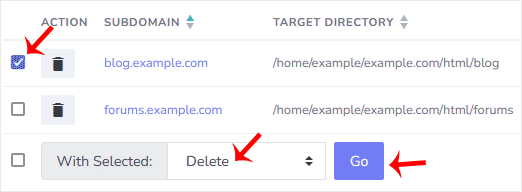

4. A confirmation window will appear. Select Delete domain directory to remove the directory or leave it as it is, and choose Delete.
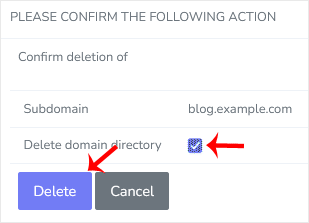

You should see a success message that the subdomain has been removed.

Aradığınız Bilgiyi Bulamıyor musunuz?

Bilgi bankasını detaylı olarak incelediniz, fakat ihtiyacınız olan bilgiyi bulamıyorsanız,

Bir Destek Talebi Oluşturun.
Faydalı Buldunuz mu?
(119 defa görüntülendi. / 0 kişi faydalı buldu.)

Powered by WISECP
Top