


 Turkey (Türkçe)
 Worldwide (English)
A subdomain is an additional part of your primary domain. Please, follow this tutorial to remove a subdomain in SiteWorx.
1. Log in to your SiteWorx account.
2. In the Domains section, click on Subdomain.
3. Choose the Subdomain you want to remove, and select the Delete option from the drop-down menu. Then click on Go.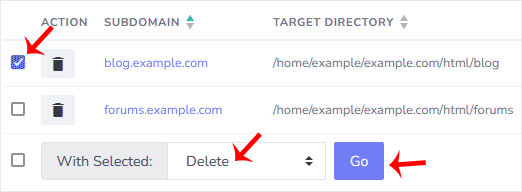
4. A confirmation window will appear. Select Delete domain directory to remove the directory or leave it as it is, and choose Delete.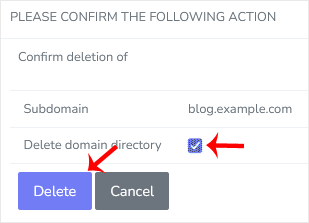
You should see a success message that the subdomain has been removed.
