


Y���kleniyor...
X

Lütfen Ülke (Bölge) Seçiniz

Türkiye (Türkçe)Türkiye (Türkçe) Worldwide (English)Worldwide (English)
X

Lütfen Para Birimi Seçiniz

Türk Lirası $ US Dollar
X

Lütfen Ülke (Bölge) Seçiniz

Türkiye (Türkçe)Türkiye (Türkçe) Worldwide (English)Worldwide (English)
X

Lütfen Para Birimi Seçiniz

Türk Lirası $ US Dollar
Bilgi Bankası How to Set Custom/Private Nameservers in WHM

How to Set Custom/Private Nameservers in WHM

75 görüntüleme 0 faydalı buldu

You can set up custom/private nameservers from WHM.


1. Log in to WHM Account.


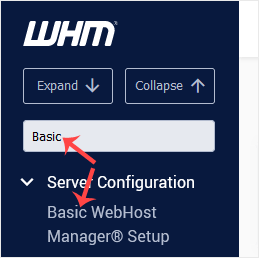
2. Go to Server Configuration >> Basic WebHost Manager® Setup or type Basic in the menu filter box. The option will appear. Click on it.

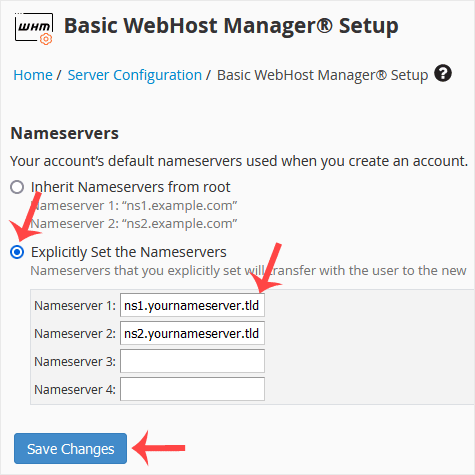
3. Under Nameservers, select Explicitly Set the Nameservers. Enter or change the nameservers. Then click on Save Changes.


Note: Domain propagation takes up to 24 hours.

Aradığınız Bilgiyi Bulamıyor musunuz?

Bilgi bankasını detaylı olarak incelediniz, fakat ihtiyacınız olan bilgiyi bulamıyorsanız,

Bir Destek Talebi Oluşturun.

Faydalı Buldunuz mu?