


Y���kleniyor...
Yeni satın alımlara özel %20 İNDİRİM — Kod: ZIP20
X
X

Select Your Currency

₺ Türk Lirası $ US Dollar
Bilgi Bankası How to Change the Network Card to Virtio, Intel PRO, or Realtek in SolusVM

How to Change the Network Card to Virtio, Intel PRO, or Realtek in SolusVM

218 görüntüleme 0 faydalı buldu

You can change your network card from the SolusVM control panel.


1. Log in to your SolusVM Control Panel.

2. If you have multiple VPSs, select the appropriate one.
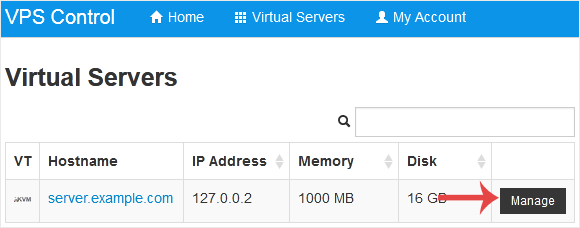


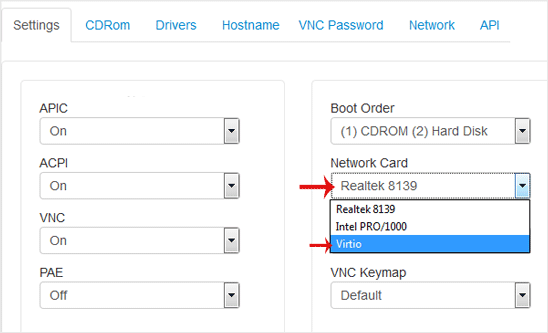
3. Scroll down. Under the Settings tab, you can find the Network Card option. Select the appropriate network card from the drop-down menu.


4. Reboot your VPS so that the changes can take effect.

Can't find the information you are looking for?

Create a Support Ticket

Did you find it useful?

Şimdi
Arayın

WhatsApp ile
İletişim Kur

X
X

Select Your Currency

₺ Türk Lirası $ US Dollar