


Y���kleniyor...
Yeni satın alımlara özel %20 İNDİRİM — Kod: ZIP20
X
X

Select Your Currency

₺ Türk Lirası $ US Dollar
Bilgi Bankası How to Edit an Account Level/Global Email Filter in cPanel

How to Edit an Account Level/Global Email Filter in cPanel

201 görüntüleme 0 faydalı buldu

1. Log in to your cPanel account.

2. In the Email section, click on Global Email Filters.

 

3. Under Current Filters are displayed all existing filters. Click Edit next to the appropriate one.
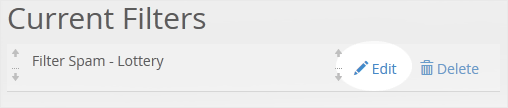

4. Make the desired changes to the filter.

5. Click on Save.

Can't find the information you are looking for?

Create a Support Ticket

Did you find it useful?

Şimdi
Arayın

WhatsApp ile
İletişim Kur

X
X

Select Your Currency

₺ Türk Lirası $ US Dollar