It is possible to delete posts in bulk using WordPress. You can also delete selected posts in bulk.
1. Log in to the WordPress dashboard.
2. From the Dashboard menu, go to Posts and click on All Posts.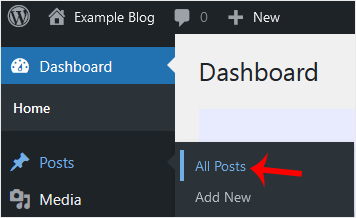
3. Checkmark the top checkbox to select all posts.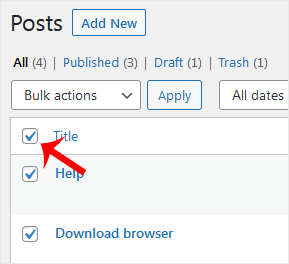
4. Click on Bulk Actions and select Move to Trash from the drop-down menu. Then click on Apply.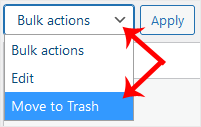
Your post has been moved to Trash. If you want to delete it permanently, click on Trash and choose Empty Trash.
Bilgi bankasını detaylı olarak incelediniz, fakat ihtiyacınız olan bilgiyi bulamıyorsanız,
Bir Destek Talebi Oluşturun.



 Türkiye (Türkçe)
 Worldwide (English)